Your booking page works. Patients pick a slot, the confirmation goes out, the diary fills. Then the first patient arrives and you spend the opening ten minutes of a fifty-minute appointment on a clipboard: date of birth, GP, medication, who to call in an emergency, have you been here before. The clinical hour has already lost a fifth of itself to admin that could have been done a week earlier.
So you go looking for an intake form for a private clinic on WordPress, and the first answer everyone reaches for is to add the questions to the booking form. It seems obvious. It is also the single most reliable way to reduce the number of people who finish booking at all.
This is the practical version: which questions belong where, why the timing matters more than the wording, and what to leave off the screen entirely.
The mistake is not the questions. It is when you ask them.
Clinics tend to treat intake as one object — a form, the form, the thing a new patient fills in. It is easier to build and much easier to use when you think of it as three separate moments, each with its own job.
- At booking. Only what decides whether the appointment can be made at all.
- Between booking and the appointment. The intake proper — history, medication, context. The patient has already committed, so they will spend time here that they would never have spent before clicking Book.
- In the room. Anything where the next question depends on the answer, and anything you would not want a person to be alone with.
Almost every intake problem is a question sitting in the wrong one of those three.
What belongs on the booking form (less than you think)
The booking form has one job: turn an intention into an appointment before the patient changes their mind. Every field you add is another opportunity to stop. That is not a theory about web forms, it is the thing every clinic discovers the month after they add three more questions.
Apply one test to each candidate question: does the answer change whether, or with whom, this booking can happen? If it does, ask it now. If it does not, it can wait.
- Passes: name and email (without them there is no patient record), phone if you send SMS reminders, and the one or two screening questions that would make you decline or redirect the booking — age for a service with a lower limit, or whether they have been referred where you require it.
- Fails: full medical history, current medication, emergency contact, GP details, insurer, previous treatment. None of these change whether the appointment can go ahead. All of them are things you genuinely need — just not in the thirty seconds where the patient is deciding.
If you are still setting the booking step up, the fields themselves are covered in the booking form field docs. (And if you have not put booking on the site yet, start with how patients make an appointment on your website — this article assumes the booking part already works.)
The intake form itself: after they book, before they arrive
This is where the real form lives, and the psychology is completely different. A patient who has booked has committed. They have a date in their calendar and a reason to prepare. Ten minutes of questions here is reasonable; the same ten minutes before booking would have lost you a third of them.
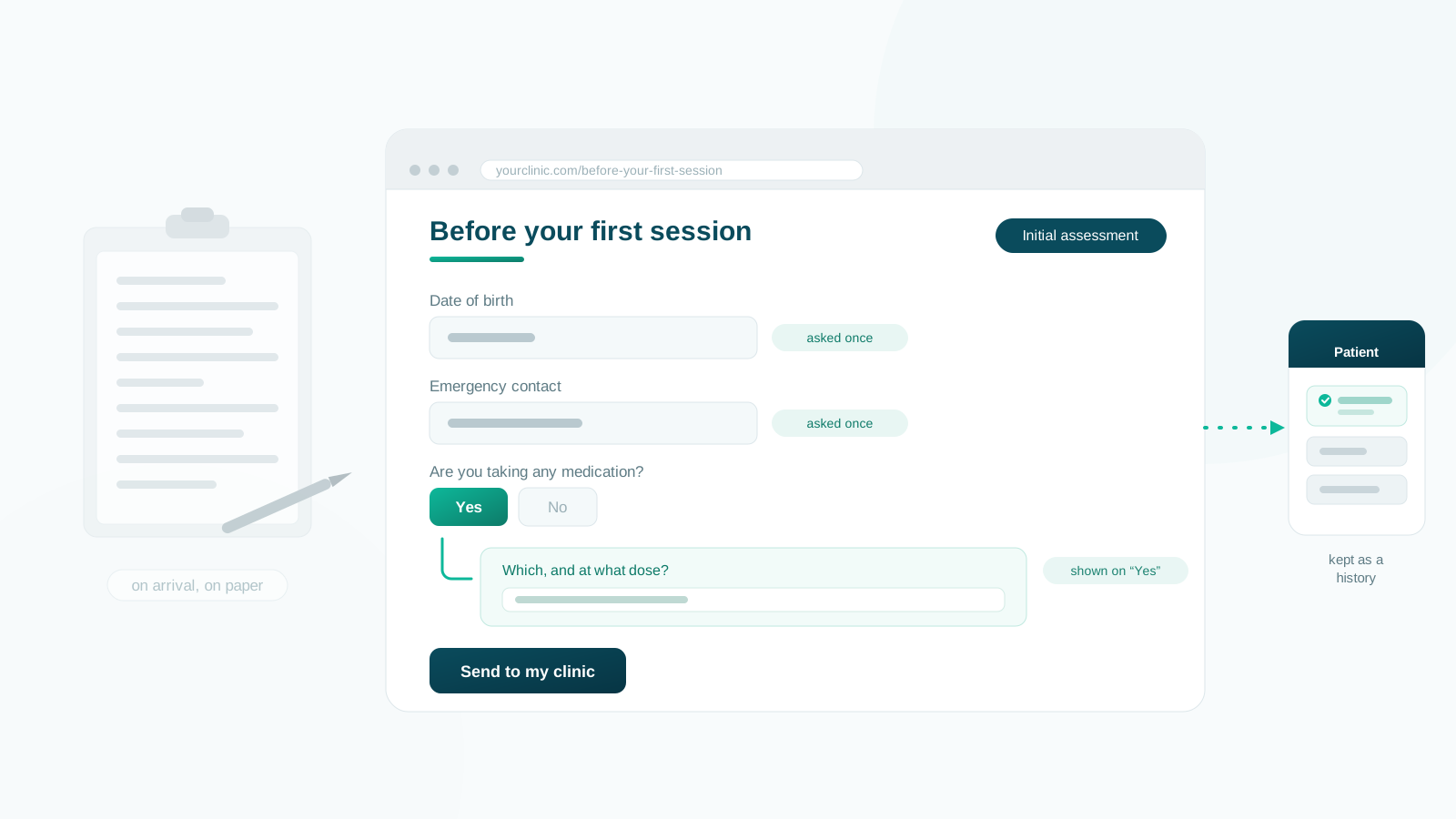
On WordPress, the mechanics are simpler than most clinics expect. You build the form, put it on a page of its own — call it something like Before your first session — and link that page from the email the patient already receives. In Alnora that is a form with its own shortcode, dropped on any page you like.
Two ways to send them there, and they suit different things:
- Automatically, for everyone. Put the link into your booking confirmation email template once. From then on every patient who books is asked, and nobody on your team has to remember. For first-session intake this is almost always the right answer.
- By hand, to chosen patients. For the one-off — a new questionnaire you want from everyone seen this year — write to the patients you pick and include the link.
One honest limitation to plan around: a patient has to be signed in to fill in a form that writes to their clinical record. That is deliberate rather than an oversight — the alternative is trusting an email address typed into a public box, which would let anyone who guesses an address write into another person’s notes. But it does mean the link goes to patients who have booked and have an account, not to cold enquiries, and it is friction you should decide about now rather than discover later.
Ask the permanent things once
Some answers belong to the person, not to the visit. Date of birth, identification number, emergency contact, responsible adult, GP, insurer — these do not change between appointments, and asking for them every time is the clearest signal a practice can send that it is not keeping track of its own patients. Patients notice. It is the same irritation as being asked for your address by three people in one phone call.
So a question needs to say where its answer lives: against the patient, where it is asked once and stays, or against the booking, where it is asked fresh each time. Get this split right and a returning patient’s intake is three questions instead of thirty.
The other half matters just as much. Questions like how has the pain been this week? or how many units are you drinking? are worthless as a single stored value — the whole point is the change between one visit and the next. Those need to be kept as a history, one entry per submission, so you can read this month against last month. If your form tool overwrites the previous answer, you are throwing away the measurement you are actually taking.
One intake form is rarely enough
A single intake form across a whole practice ends up as the union of everything anyone might need to ask, which means most patients answer questions that have nothing to do with them. A child assessment, a couples session and a six-week follow-up are not the same interview, and pretending otherwise produces a long form that is mostly irrelevant to whoever is reading it.
It is far better to have several short forms, each aimed at the appointment it belongs to — by service, by practitioner, by location, or by whether this is a first visit or a returning patient. Alnora matches forms by condition and uses the first one that fits, so the patient only ever meets the questions that apply to them.
Within a single form, conditional questions do the same job at a smaller scale: ask are you currently taking any medication? and only show the follow-up when the answer is yes. A form of forty questions where thirty are hidden feels like a form of ten.
Not every question is for the patient
Two distinctions here are worth setting up deliberately, because retrofitting them later is unpleasant.
Some questions are answered by your team, not the patient. A risk assessment, a triage flag, a note about how the referral came in — these belong on the intake form as far as your clinician is concerned, and should never appear on the patient’s screen at all. A form tool that can hide a question from the patient while still asking it of staff on the admin side saves you keeping a second, parallel form somewhere else.
Where the answer is kept decides who can read it. An answer filed with the patient’s contact details is reasonable for reception to see. An answer filed as clinical information should not be, even though the same receptionist may have typed it in from a phone call. If your roles cannot express that difference, every question you add is visible to everyone who can open a patient, and you will end up not asking some of them.
What to leave out
Three things are worth resisting, even once you can technically do all of them.
- Questions where the follow-up depends on the answer. Anything that in person would make you lean forward and ask tell me more about that is a conversation, not a field. A free-text box collects a sentence where a clinician would have got five minutes.
- Anything distressing, asked cold. A screening question about self-harm or abuse, answered alone at eleven at night with nobody to respond, is worse than the same question asked by a person who can react to it. If you must ask it online, say plainly what happens next and how quickly.
- The PDF you attach and hope for. A downloadable form that patients print, complete and bring is not an intake form — it is homework, and the completion rate reflects that. A structured answer you can read, search and compare against last visit is worth more than a scanned sheet nobody re-types.
And resist length for its own sake. A pre-visit form that is too long gets abandoned exactly like a booking form that is too long — you have just moved the abandonment somewhere you cannot see it. If your intake runs past a couple of screens, split it: the essentials before the first visit, the rest asked in the room or at the second appointment.
Putting it together
A working setup for a private clinic on WordPress usually looks like this. The booking form asks four or five things. The confirmation email carries a link to a short intake form on its own page, different for each service, with the irrelevant questions hidden. Permanent details are asked once and stay on the patient’s record. Repeating measures are kept as a history so you can see the trend. A few questions are staff-only and the patient never sees them. And the clinician opens the appointment already knowing who is walking in.
None of that requires a developer, and none of it requires sending patient records to a third-party form service — which for clinical answers is a decision worth avoiding if you can, since it is your practice that has to account for where those answers live.
Alnora does this inside the WordPress site you already have: a form builder with conditional questions, a different form per service or practitioner, answers kept as a history against the patient rather than overwritten, and per-question control over who on your team can read what. The records stay on your own server. There is a free version if you would rather try the booking side first.
Want to see it from the patient’s side? Try the live demo — it takes about two minutes and there is no sign-up.