The right doctor, booked in a few taps
Let patients find the right doctor and time themselves, see them in clinic or by video, and keep every record encrypted on your own server — one plugin instead of five.
Everything a private practice needs
From a single GP to a group of specialists across several sites, Alnora fits how the clinic actually runs.
Every doctor and specialty
Add unlimited doctors, each with their own consultations, working hours and breaks, so patients book the right person for the right problem instead of a generic slot.
In clinic or by video
Mark a consultation as telehealth and Alnora creates a Zoom or Google Meet link for each booking and sends it to the patient — useful for follow-ups and results.
Encrypted medical records
Histories, notes, test results and uploaded documents live against each patient — encrypted (AES-256) and stored on your own server, never a third-party cloud.
Prescriptions & documents
Produce a prescription or diagnosis PDF in a click, on your own letterhead, and keep it with the visit it belongs to rather than in a folder somewhere.
Fewer wasted appointments
Automatic email, SMS and WhatsApp reminders before every visit, and a waitlist that offers a cancelled slot to the next patient without anyone ringing round.
Payments & invoices
Accept Stripe and PayPal, take a deposit where it helps, and generate a branded invoice PDF after each consultation — no separate shop plugin. Refunds go back to the card from the appointment itself.
One practice or several
Run a single surgery or a group across locations, each with its own doctors and availability, all from one WordPress install and one licence.
Sent to the right doctor, first time
Patients pick the doctor and the consultation themselves, so reception is not translating symptoms into a diary.
They choose
A patient picks the consultation they need and sees only the doctors who offer it, with real availability rather than a request form.
They are seen
In clinic, or by video with a link generated for that booking alone. Reminders go out beforehand on the channels you choose.
It goes on the record
Notes, results and any prescription PDF attach to the visit, in an encrypted record only the roles you allow can open.
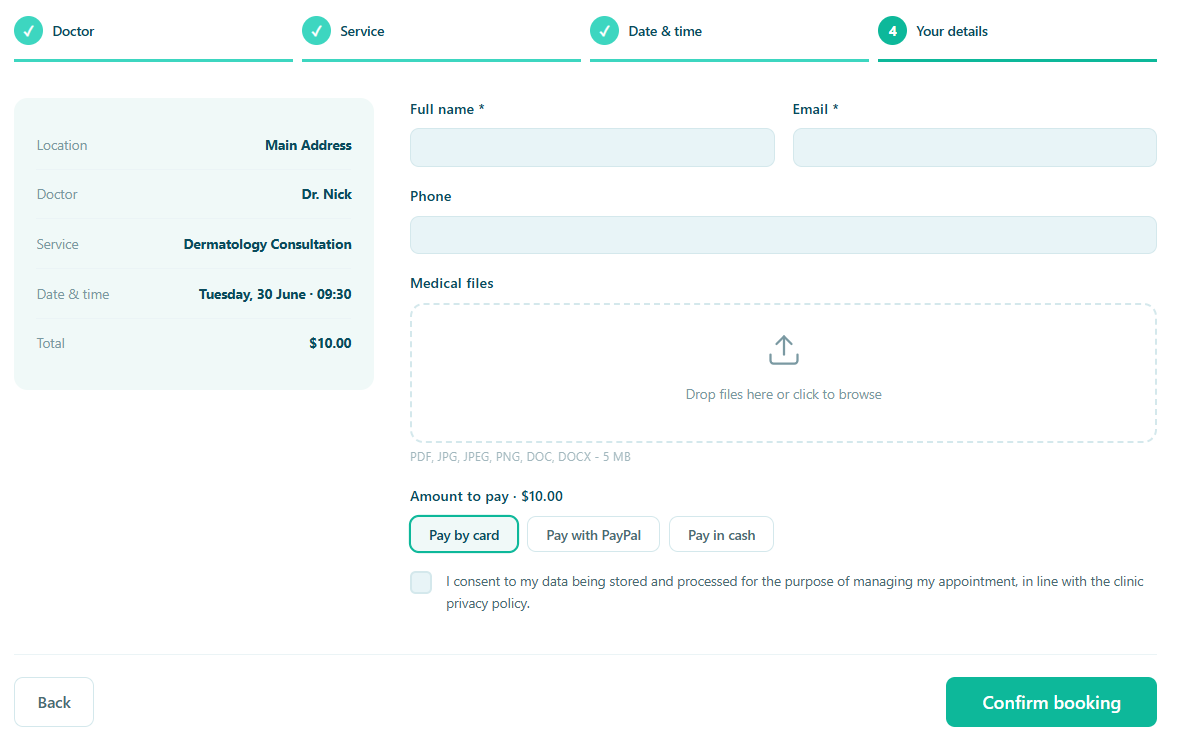
A diary that fills itself, correctly
Availability comes from each doctor’s own hours, breaks and consultation lengths, so the times a patient sees are times you can actually keep. Nothing double-books, and nothing needs confirming by hand.
- Real availability per doctor, not a request to call back
- Follow-ups booked as a repeating series in one step
- A waitlist that fills cancellations automatically
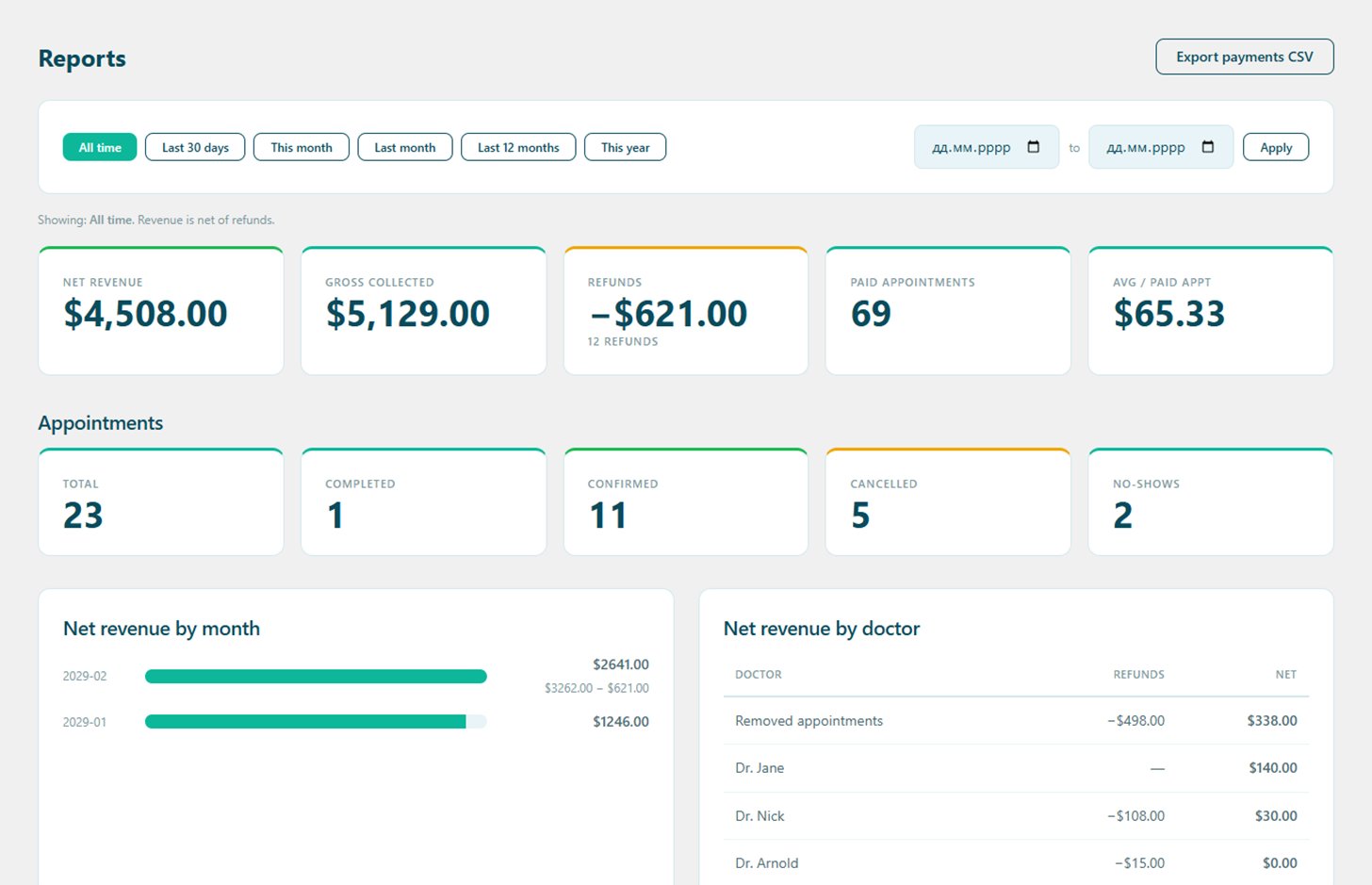
What the practice actually earned
Once several doctors are working across more than one site, the question stops being how busy it feels and starts being what each consultation, doctor and location brought in. That is a report, not a spreadsheet evening.
- Revenue by doctor, consultation and location
- Cancellations and no-shows counted, not guessed at
- Exportable, so your accountant gets a file and not a login
Medical records that stay in the practice
A private practice holds the same category of data as a hospital, with none of its IT department. Alnora keeps histories, notes and results in your own WordPress database — encrypted there, with no Alnora cloud in the middle and no fee per patient.
AES-256 at rest
Histories, contact details, results and uploaded documents are encrypted inside the database itself.
You can hold the key
Move the encryption key out of the database into wp-config.php, so a stolen dump is useless on its own.
Doctor, nurse, reception
Each doctor sees their own diary and their own patients. Reception can have the bookings without the clinical notes.
GDPR without an add-on
Export, erasure, consent records and an audit log are part of the plugin, not a second purchase.
What a private practice usually runs, and what it could run instead
The usual stack
A booking plugin, WooCommerce behind it for payments, a forms plugin for intake, a video tool joined on by hand, a GDPR add-on, and records in whatever came with the building. Six things to keep updated.
Alnora on its own
Booking across every doctor and site, payments and invoices, telehealth links, encrypted records, prescription PDFs, reminders, reports and GDPR tools — one plugin, inside the WordPress site you already run.
Before you switch
Can each doctor keep their own hours and consultation lengths?
Yes. Every doctor has their own services, working hours and breaks, and availability is worked out from those rather than from one clinic-wide timetable. A twenty-minute follow-up and a forty-minute first consultation can sit in the same diary without colliding.
Can we run several sites from one installation?
Yes. Add each location, assign doctors to the ones they work at, and patients pick the site when they book. It stays one WordPress install, one database and one licence — reports can then be read per location or across all of them.
Where do patient records and test results live?
In your own WordPress database and uploads folder, on hosting you chose. Fields you mark as sensitive are encrypted with AES-256, and the encryption key can be kept outside the database entirely, so a copy of the database is not enough to read them.
Can reception book on a patient’s behalf without seeing clinical notes?
Yes. Reception can be given bookings, payments and contact details while clinical notes stay with the doctor. Every permission is re-checked on the server, so it is not a matter of hiding parts of the screen.
Do video consultations need another subscription?
Connect the Zoom or Google Meet account you already have and Alnora generates a link per booking, then sends it with the confirmation and reminders. There is no separate telehealth product to buy and no shared room that every patient joins.
More answers on the full FAQ page.
Give your practice software that fits.
Start free, or unlock the full toolkit with Pro — 30-day money-back.
Not sure where to start? Read the documentation.