Booking built around treatment plans
Book a whole course in one step, keep progress notes secure, and cut no-shows — all from your own WordPress site, with one plugin instead of five.
Everything a physio clinic needs
From treatment courses to progress notes, Alnora fits how you work.
A course, not just one visit
Recurring appointments let patients book a whole course of treatment at a regular interval in a single step — they see every session date before confirming, and can pay for the entire course online in one checkout.
Treatment records & scans
Keep assessments, progress notes and uploaded scans or documents per patient — encrypted (AES-256) and stored on your own server.
Every therapist & room
Add unlimited physiotherapists, each with their own services, working hours and breaks, across one clinic or several locations.
Fewer no-shows
Take a deposit at booking and send automatic SMS, WhatsApp and email reminders so patients keep their slots in the series.
Remote follow-ups
For tele-rehab or check-ins, Alnora can attach a Zoom or Google Meet link to the appointment automatically.
Payments & invoices
Accept Stripe and PayPal, take deposits, and generate a branded invoice PDF after each session — no separate shop plugin. Need to give money back? Issue full or partial refunds to the patient’s card straight from the appointment.
Several services in one visit
Let patients book an assessment and treatment together — the durations and prices add up automatically and the whole slot is reserved. Need to move a session? Reschedule to a new time in a click and the patient is re-notified.
One booking, one payment, one record
A course of treatment should not mean re-typing the same diary entry every week.
Assess
The patient books an initial assessment online and answers your own intake questions as they book. Their record exists before they walk in.
Book the course
Turn the plan into a repeating series in one step. Every session date is shown before they confirm, and the whole course can be paid for in a single checkout.
Track & discharge
Add progress notes and scans after each visit, reschedule the ones that move, and keep the full history in one encrypted record.
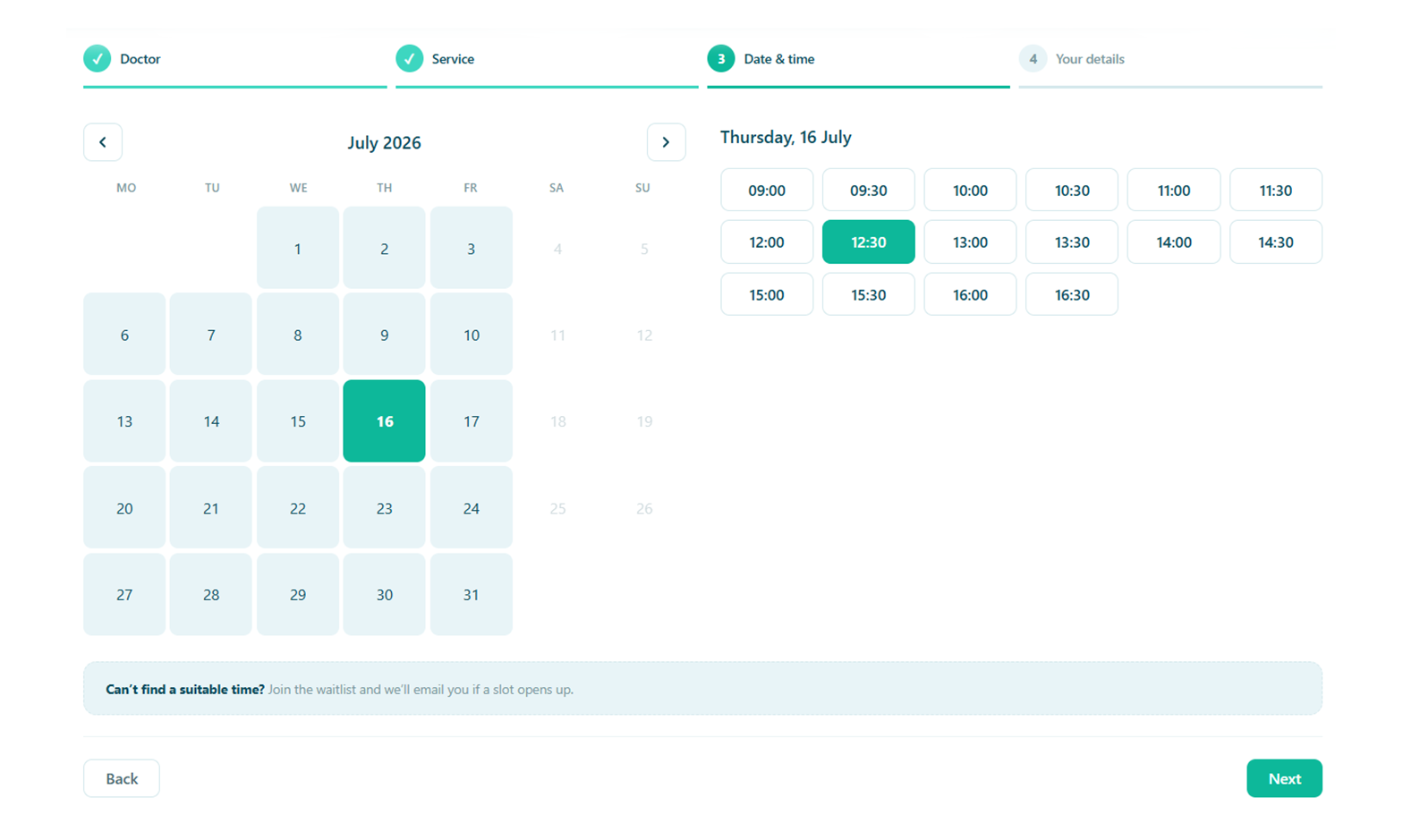
From first assessment to last session
Patients book a recurring course, get reminded before each visit, and a freed slot is offered to the next person on the waitlist — your schedule stays full and on track.
- Recurring appointments for a course of treatment
- Deposits plus SMS / WhatsApp reminders to cut no-shows
- A waitlist that fills cancellations automatically
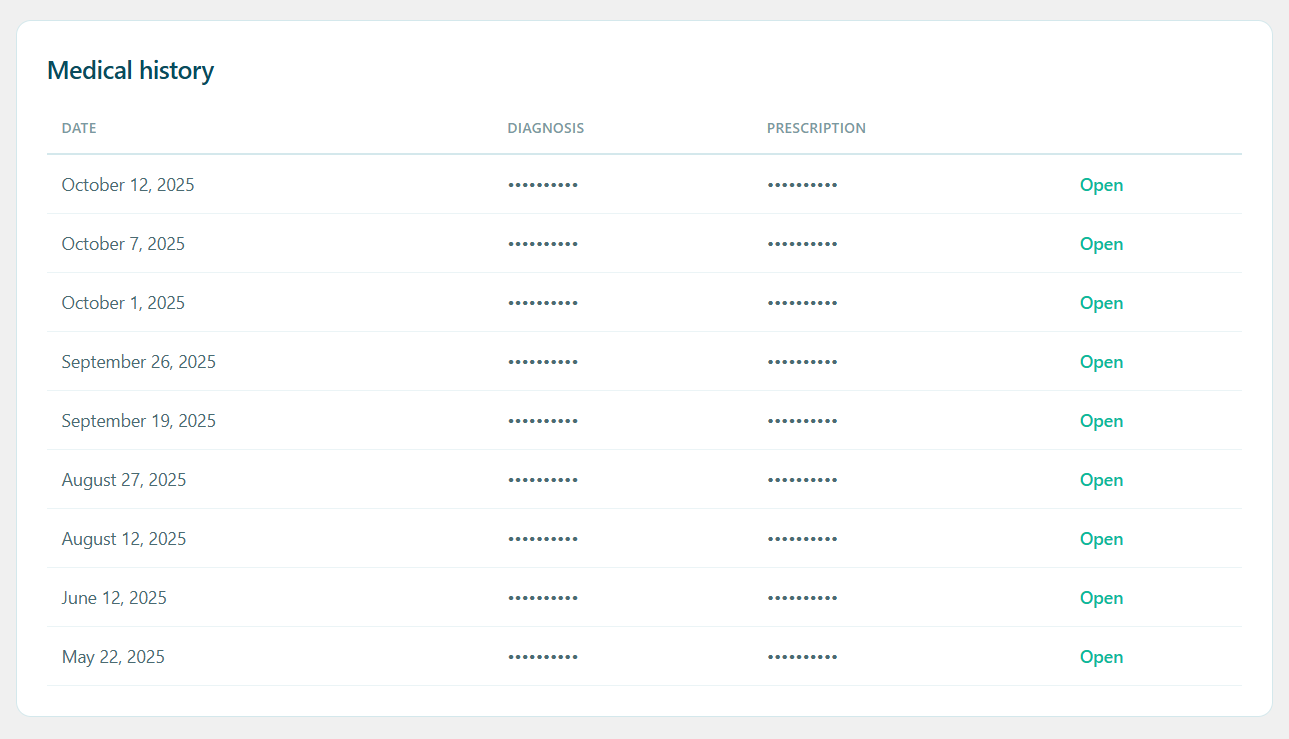
Every session on one timeline
Assessment findings, progress notes, exercise plans and uploaded scans build up against one patient instead of scattering across a spreadsheet, an inbox and a filing cabinet.
- Notes, measurements and document uploads per patient
- Your own intake questions, on a form you build yourself
- Visible to the therapist treating them — unless you say otherwise
Clinical notes that never leave your hosting
There is no Alnora cloud to trust and no per-patient fee. Everything lives in your own WordPress database — and the sensitive parts are encrypted there, not merely hidden behind a login.
AES-256 at rest
Notes, contact details and uploaded files are encrypted inside the database itself.
You can hold the key
Move the encryption key out of the database into wp-config.php, so a stolen dump is useless on its own.
Roles that mean something
Each therapist gets their own diary and their own patients. Reception can have bookings without clinical notes.
GDPR without an add-on
Export, erasure, consent records and an audit log are part of the plugin, not a second purchase.
What a physio clinic usually runs, and what it could run instead
The usual stack
A salon booking plugin, WooCommerce behind it for payments, a forms plugin for intake, a GDPR add-on, and a spreadsheet for notes. Five things to keep updated and five places for patient data to sit.
Alnora on its own
Booking, recurring courses, deposits and payments, intake forms, encrypted records, reminders, invoices and GDPR tools — one plugin, inside the WordPress site you already run.
Before you switch
Can a patient book a whole course of treatment themselves?
Yes. Mark a service as recurring and the patient picks the interval and how many sessions they want while booking. Every date is listed before they confirm, and if a repeat lands on a day off or a full slot it rolls forward to the next free time instead of silently disappearing.
Where do progress notes and scans actually live?
In your own WordPress database and uploads folder, on your own hosting. Fields you mark as sensitive are encrypted with AES-256, and the encryption key can be kept outside the database entirely so a database dump is not enough to read them.
Can each physiotherapist see only their own patients?
Yes. A therapist signs in to their own diary, services and patients, and reception can be given bookings without clinical notes. Every permission is re-checked on the server, so it is not a matter of hiding buttons in the interface.
Do I need WooCommerce to take payments or deposits?
No. Stripe and PayPal connect directly, including percentage or fixed deposits and paying for a whole course in one checkout. Invoices come out as branded PDFs without a shop plugin anywhere in the site.
We already have years of patients in a spreadsheet. Can we move them?
Import patients and therapists from CSV, and export them the same way. Rows are matched against what you already have rather than duplicated, so a second import corrects the first instead of doubling it.
More answers on the full FAQ page.
Give your clinic software that fits.
Start free, or unlock the full toolkit with Pro — 30-day money-back.
Not sure where to start? Read the documentation.