Online booking built for private clinics
Let patients find the right doctor, service and time and book in a few taps — on your own WordPress site. Your front desk stops playing phone tag.
Online booking that fits how your clinic runs
From multiple practitioners and services to categories, search and multiple locations — patients get to the right slot, fast.
Unlimited doctors & staff
Add as many practitioners as you need, each with their own services, working hours and breaks — patients book the right person for the right treatment.
Read docsSeveral services in one visit
Let a patient add multiple services to a single appointment — durations and prices add up automatically and the whole slot is reserved.
Read docsDoctor & service categories
Group your team and menu into categories, with a category filter on the booking form so patients narrow down to what they need faster.
Read docsSearch doctors & services
Got a long list? Patients type a name instead of scrolling — and it combines with categories, so the chips narrow the list and search looks within it.
Read docsReschedule in a click
Move a booking to a new time from its details panel — the patient is re-notified and calendars, Zapier and reminders all update automatically.
Read docsAdd phone & walk-in bookings
Take bookings straight from the admin — search an existing patient or add a new one, and it behaves exactly like a booking the patient made themselves.
Read docsCustom booking-form fields
Add the exact fields your clinic needs to collect at booking, so your front desk has the details ready before the patient arrives. Each one decides when it appears, who is asked it, where the answer is kept and whether it is repeated in the notification your team reads.
Read docsA different form for different patients
One set of questions rarely fits every appointment. Build as many forms as you need — an intake questionnaire for one doctor’s assessments, a consent form, a pre-visit review — and let conditions decide who meets which: by doctor, service, location, or whether the patient is new.
Read docsReturning patients sign in
A patient who already has a portal account can sign in while booking — their details fill in for them and the visit joins their existing record instead of creating a second one for the same person.
Read docsOne or many locations
Run a single clinic or several sites and rooms, each with its own doctors and availability — all from one WordPress install. Add a photo and contact details to each branch and patients see them, and pick the right one, before they book.
Read docsLive in three steps
Add doctors, services & hours
Set up your practitioners, the services they offer and each one’s working hours, breaks and holidays.
Drop in the booking form
Embed the booking form on any page with a shortcode — matched to your brand colors and fonts. Pre-filter it by doctor, service or location if you like.
Patients book, you manage
Bookings land in one Appointments screen you can filter and search — or add phone and walk-in bookings there yourself.
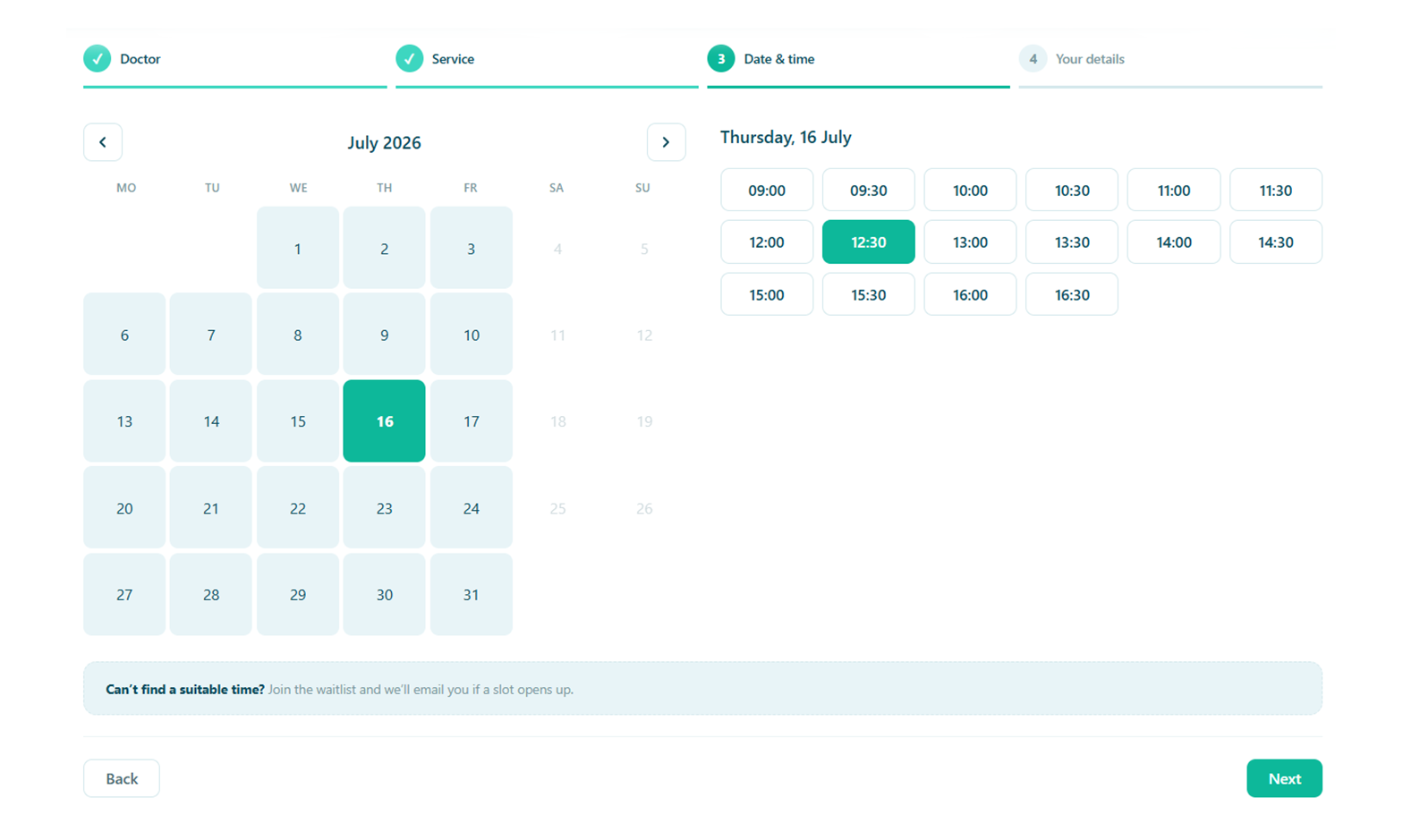
The right slot, in a few taps
Patients pick the practitioner and service, see real availability, and confirm — with only the fields your clinic actually needs. Fewer drop-offs, fewer back-and-forth calls.
- Real-time availability per doctor, service and location
- Categories and search to shortcut long lists
- Reschedule in a click, with the patient re-notified automatically
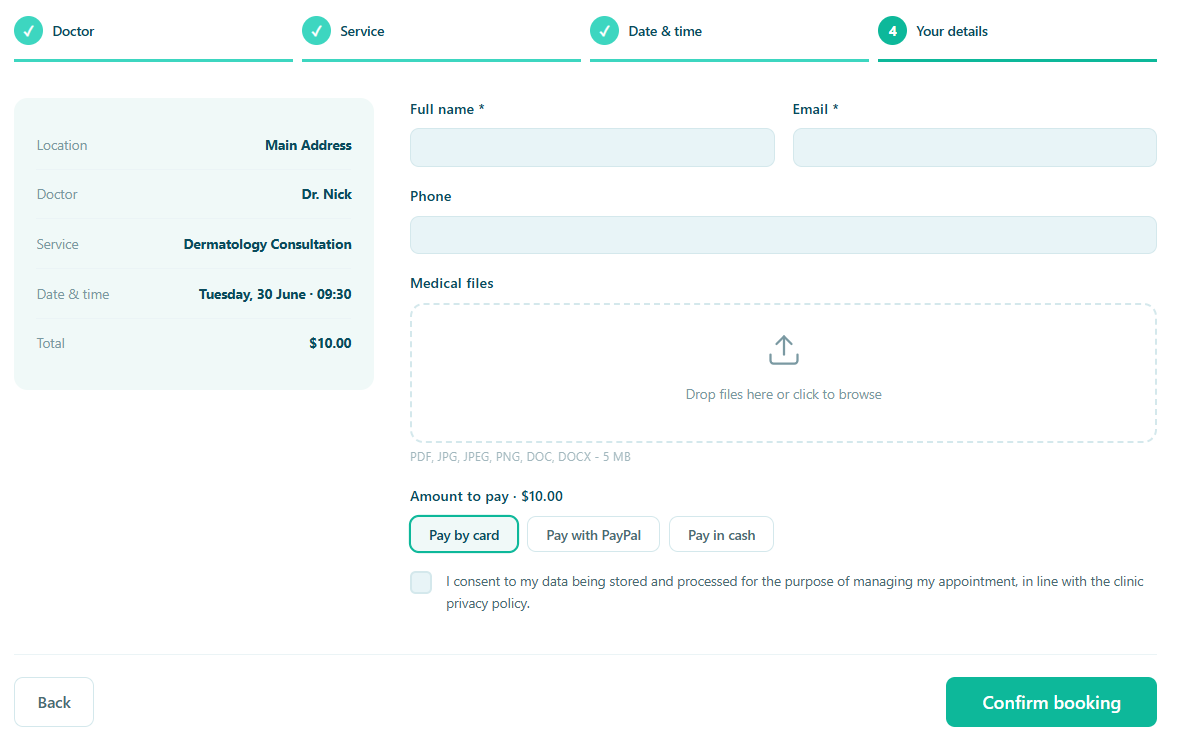
A fully customizable booking form
Add any field your clinic needs — text, dropdowns, checkboxes, dates, yes/no questions or file uploads — and decide far more than whether it is required.
- Show a field only for certain doctors, services or locations, or only for a returning patient
- Choose who is asked: patients booking online, your staff on Add appointment, or the patient in their portal
- Choose where the answer is kept: the patient record, their clinical information, their contact details, their portal — or your Zapier webhooks
- Keep a clinical answer off-limits to reception, who can record it over the phone without reading it back
- Let patients keep their own answers up to date from the portal, so you are not chasing them
- Keep an answer out of the booking email your team reads, without stopping it being asked or saved
The result is one question asked once, in the right place, kept where it belongs — rather than the same detail collected on three different forms and typed in again by hand.
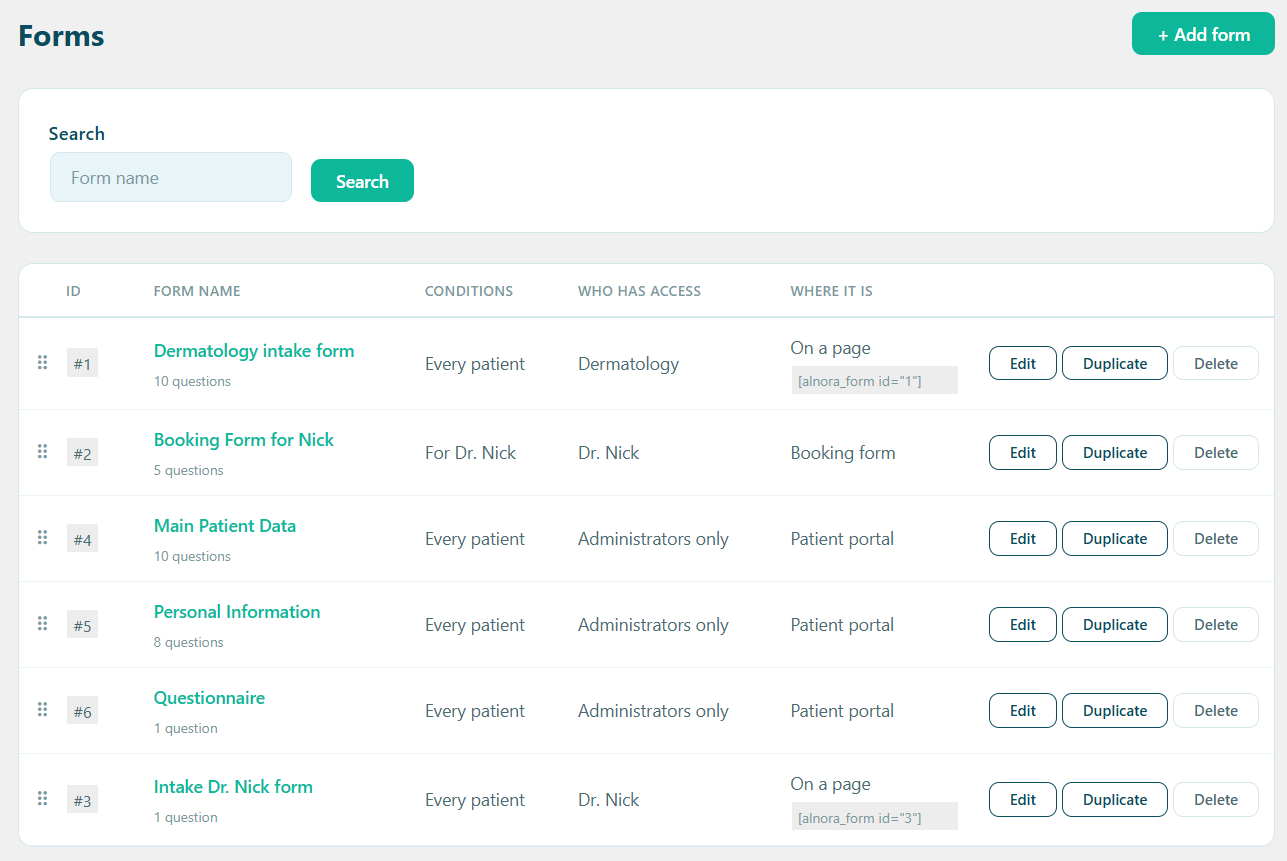
More than one form, when one is not enough
A first physiotherapy assessment and a five-minute follow-up do not need the same questions, and asking everybody everything is how a booking form starts losing patients half way down. So the questions above are not the only set you get: build as many named forms as you like, and let conditions decide who meets which.
- Aim a form by doctor, doctor category, service, service category, location, or whether the patient is new or returning
- Forms are matched in the order you put them in and the first one that fits wins, so dragging a row changes which a patient gets
- Use one on the booking form — and on Add appointment, so staff taking a booking by phone are asked exactly what a patient booking online is asked
- Or in the patient portal, or on a page of its own with a shortcode
- Leave one as a draft while you build it, and duplicate a form to start a variant
Your general form is still there underneath as the fallback, so a patient nobody has aimed a form at is never left without one.
One plugin, not a stack of five
Generic booking plugins are built for salons. Alnora gives a private practice the booking engine it actually needs — multiple practitioners, services, categories, locations and staff-side bookings — inside the WordPress site you already run, with payments, records and reminders in the same tool when you need them.
Take bookings online today.
Start free, or unlock the full toolkit with Pro — 30-day money-back.
Setting it up? Read the booking guide.