Cut no-shows with automatic reminders
Remind every patient by SMS, WhatsApp, Telegram and email before their visit — automatically, in their language, in your clinic’s words. Empty slots stop eating into your day.
Every appointment reminder, on the right channel
SMS, WhatsApp, Telegram and email — sent automatically around each appointment, worded the way your clinic speaks.
Remind more than once
Set as many reminder moments as you need — the day before and again a few hours out — and give each one its own channels, so you email on Monday and text on Tuesday morning.
Read docsSMS reminders via Twilio
Automated text reminders go out before each visit, so patients turn up and your chairs stay full. Connect your own Twilio account and you are set.
Read docsWhatsApp reminders
Reach patients on WhatsApp with the same automated reminders — ideal where WhatsApp is how people actually read their messages.
Read docsTelegram messages — free
Send the same reminders over Telegram at no cost. Patients connect once with a tap — from their booking email or the patient portal — so there is no phone number to manage and nothing per message to pay.
Read docsEmail confirmations & reminders
Every booking, reschedule, cancellation and reminder can be emailed automatically, in the patient’s language.
Read docsTemplates in your own words
Edit every transactional email to match your clinic’s voice and branding — no code, just the wording your patients should read.
Read docsOne message, both channels
A single template drives both SMS and WhatsApp, so you edit the text once and never maintain two copies.
Read docsYour own tokens
Build a button, a notice, a link or a paragraph once and place it in any email, SMS, WhatsApp or Telegram template — shown only to the patients it is meant for.
Read docsChoose what gets sent
Every email and message has its own on/off switch, so you send exactly what your clinic wants and nothing it doesn’t.
Read docsWrite to your patients yourself
Everything above is automatic. This is the one screen where you start the conversation — closed on Friday, a new practitioner has joined. Choose who it goes to by doctor, service, category or location, preview it, then let it send in the background.
Read docsSet it once, then forget it
Connect your channels
Add your Twilio keys for SMS and WhatsApp; email works out of the box. Turn on exactly the messages you want to send.
Write your templates
Edit the wording for each email and message. One template drives both SMS and WhatsApp, in every language you support.
Reminders send themselves
Every booking triggers the right confirmations and reminders around the visit — no manual chasing from your front desk.
Two reminders beat one
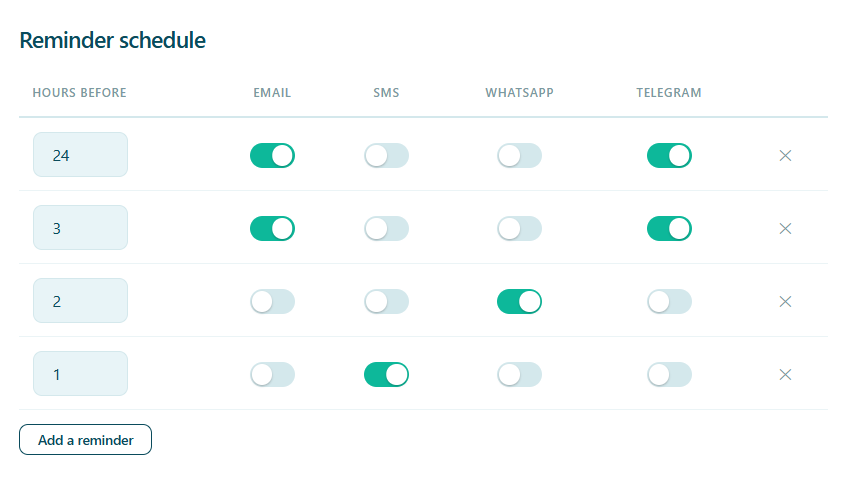
A reminder the day before gives a patient time to rearrange their morning. One a few hours out catches the person who forgot anyway. Alnora lets you send both, and pick the right channel for each moment — an email the day before, a text three hours out.
Add a row for each moment, tick the channels it should use, and that is the whole setup. Columns appear for the channels you have switched on, so a clinic with no Twilio account is not looking at SMS boxes it cannot use.
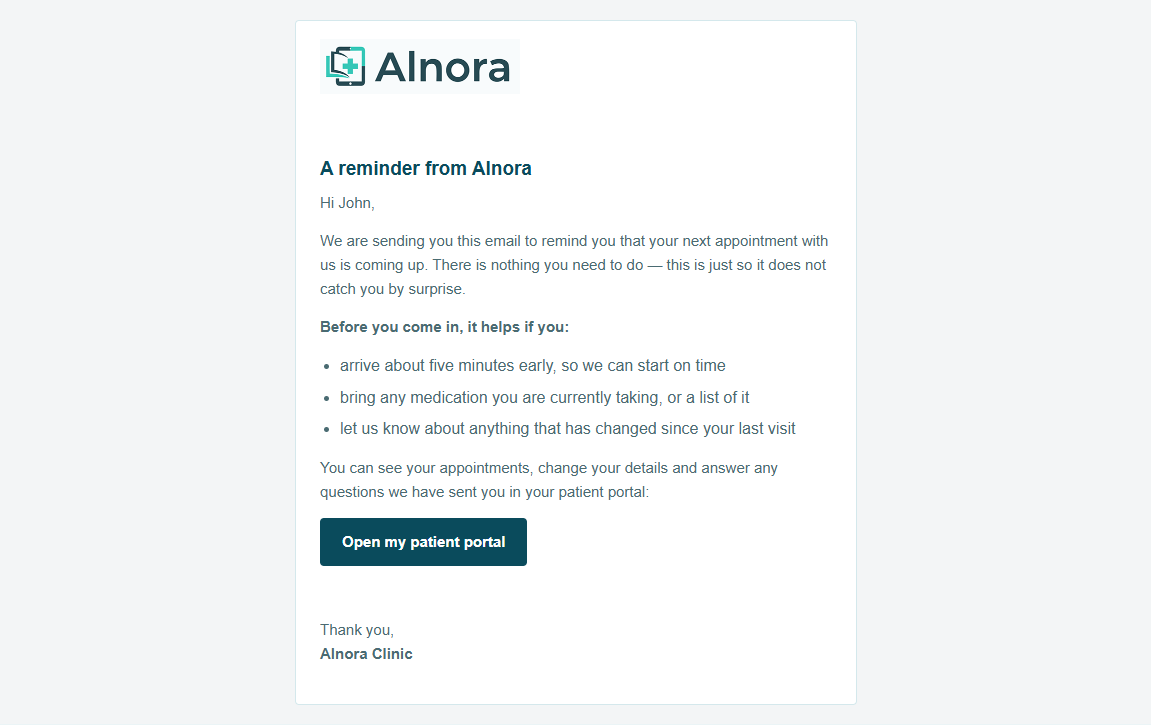
Send an brand email to your patients
Reminders go out because a patient did something. Some messages you have to start yourself: the surgery is closed on Friday, a new practitioner has joined, the flu clinic is open.
Write the words and Alnora does the rest: your logo at the top, headings, links and buttons in your own colours and corner style, and the greeting filled in with the patient’s own name. Nothing to style by hand, and it arrives looking like everything else you send.
- Choose who it goes to by doctor, service, category or location
- See the real email first, and send yourself a test
- Sends in the background, and carries on if you close the tab
- Stop part-way and nobody else is written to
- Save the ones you send every year and start from them next time
- A doctor reaches only their own patients; reception cannot send
It always goes out from your clinic address. An email from an address your website is not authorised to send for is junked or refused, and a run of them starts costing you appointment reminders too.
One template, the right words for each patient
Build a piece of content once — a Book your follow-up button, a notice that the car park is closed, a link to your pre-visit leaflet — and place it in any template, just like {patient_name}. Change it once and every email and message that uses it changes too.
Then aim it. A token can go only to new patients, only to returning ones, only to people booked with a particular doctor or service, or only to people who have seen someone before. Everyone else gets the same reminder without it — never a stray placeholder.
- Buttons, links, paragraphs, highlighted notices and images
- Works in email, SMS, WhatsApp and Telegram templates
- Aimed by new or returning, doctor, service, location or category
- Styled in your clinic’s colours, with a live preview as you build
- Switch one off and it leaves every message at once
Fewer no-shows, without nagging your team
A forgotten appointment is lost revenue and a slot another patient could have used. Pair automatic reminders with a deposit at booking and the gap between “booked” and “turned up” closes on its own — while your reception gets on with the day instead of ringing round to confirm.
Stop losing slots to no-shows.
Unlock SMS, WhatsApp, Telegram and email reminders with Alnora Pro — 30-day money-back.
Setting it up? Read the reminders guide.