See the skin concern before the patient arrives
Photos sent with the booking, consent signed before the procedure, courses of treatment booked in one step and prescriptions issued from the record — all on your own WordPress site.
Everything a dermatology clinic needs
From the first photo to the last treatment session, Alnora fits how you work.
Photos sent with the booking
Ask patients to attach a photo of the rash, mole or scar as they book. It lands in their record privately, so you see the concern before they walk in — never at a public web address.
Consent signed before the procedure
Send a consent form for a biopsy, cryotherapy or laser treatment by email, or hand over a tablet at reception. The signature, its evidence and a signed PDF stay on the patient’s card.
Courses of treatment in one step
Phototherapy twice a week, a series of peels, monthly follow-ups for acne: book the whole course at once. Patients see every date before confirming, and can pay for it in one checkout.
Prescriptions from the record
Write the diagnosis and prescription in the visit’s record and produce a branded PDF in one click — emailed to the patient by hand, or automatically when you mark the visit completed.
Follow-ups by video
Checking how a treatment is going rarely needs a room. Alnora attaches a Zoom or Google Meet link to the appointment automatically, in the same diary as your clinic sessions.
Deposits for procedures
Take a percentage or fixed deposit by card, PayPal or bank transfer when a procedure is booked, so a long slot in the treatment room is not lost to a no-show.
From the first photo to the last session
A course of phototherapy should not mean re-booking by hand twice a week.
Book and send a photo
The patient books a consultation online, answers a few questions about the concern and attaches a photo. Their record, with the photo, exists before they arrive.
Consult and consent
Examine, write the diagnosis and prescription in the record, and issue the PDF. If a procedure is next, the patient signs its consent form in their portal or on a tablet.
Treat and follow up
Book the course of treatment in one step, with a deposit if you like, and check progress at a follow-up in clinic or by video — every visit in the same record.
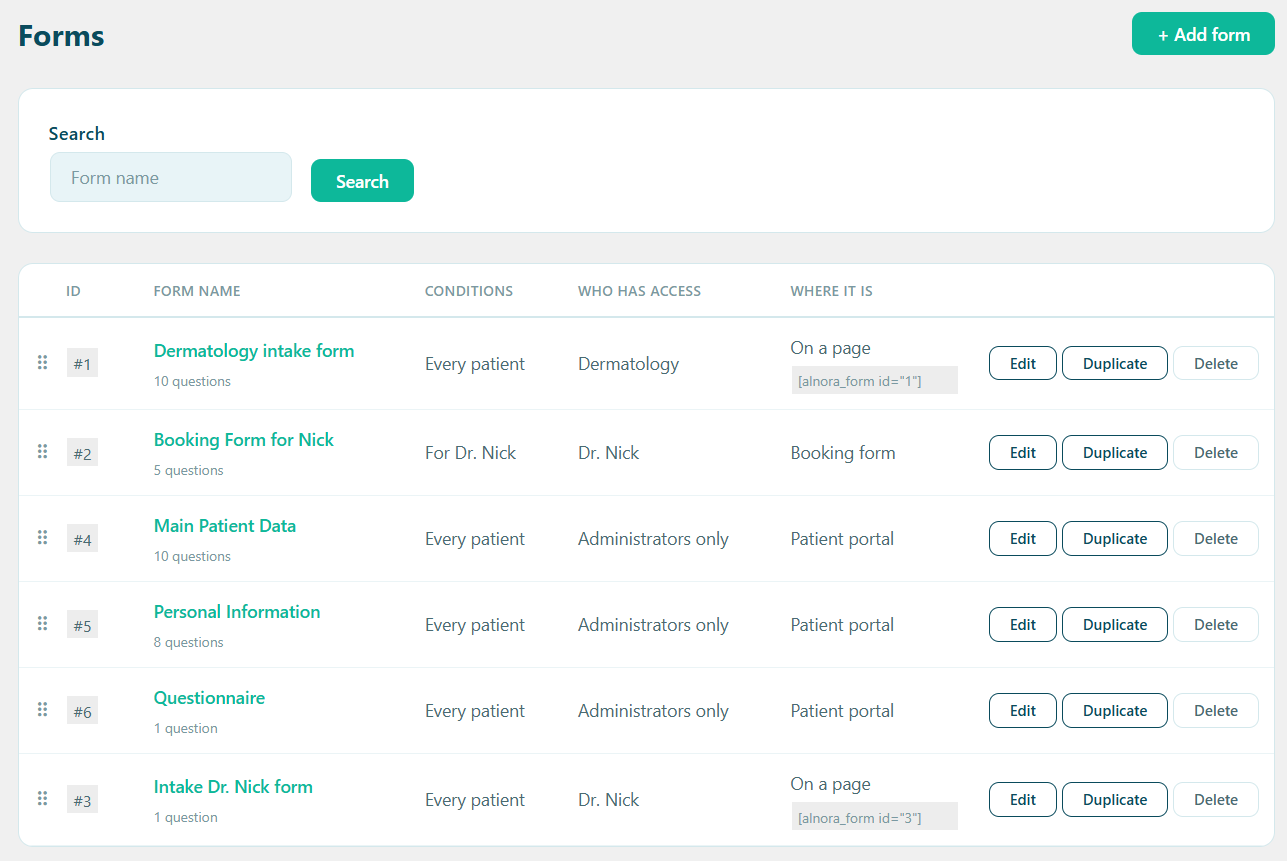
Questionnaires and consent forms, your way
A new skin concern needs its history; a laser session needs a signed consent. Build a form for each, and Alnora shows the right one to the right patient — on the booking form, in their portal, or on a page of its own.
- How long, where on the body, what has been tried — in your own words
- Typed name and drawn signature, with a signed PDF for the patient
- Aimed by service, practitioner, or new versus returning patients
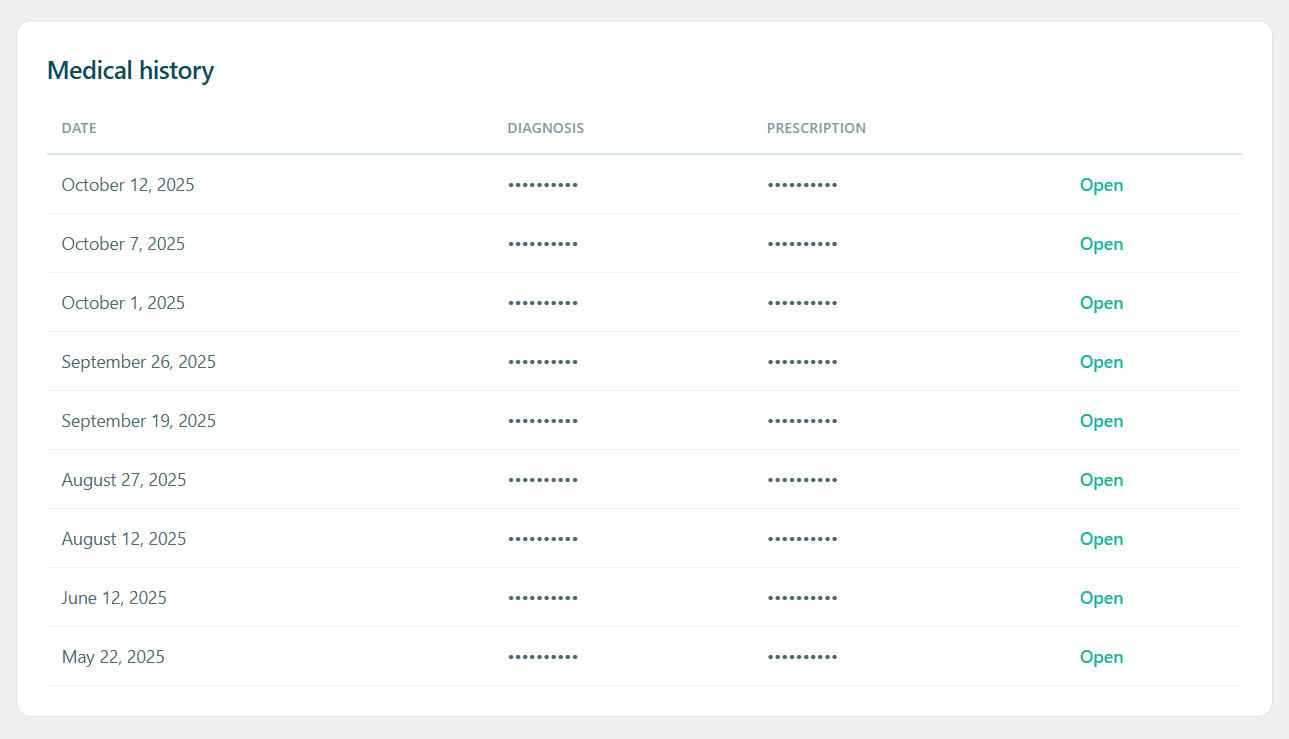
Every visit and every photo, in one place
Photos, diagnoses, prescriptions and signed consents build up against one patient, so the next appointment starts where the last one ended instead of in an email inbox.
- Notes, photos and documents per visit, encrypted
- Branded prescription and diagnosis PDFs in one click
- Visible to the practitioner treating them — unless you say otherwise
Health information that never leaves your hosting
There is no Alnora cloud to trust and no per-patient fee. Everything lives in your own WordPress database — and the sensitive parts are encrypted there, not merely hidden behind a login.
AES-256 at rest
Notes, contact details and uploaded files are encrypted inside the database itself.
You can hold the key
Move the encryption key out of the database into wp-config.php, so a stolen dump is useless on its own.
Roles that mean something
Each practitioner gets their own diary and their own patients. Reception can manage bookings without seeing clinical notes.
GDPR without an add-on
Export, erasure, consent records and an audit log are part of the plugin, not a second purchase.
What a dermatology clinic usually runs, and what it could run instead
The usual stack
A generic booking plugin, WooCommerce behind it for deposits, a forms plugin for questionnaires, a separate e-signature service for consent, and patients emailing photos to a shared inbox. Five things to keep updated and five places for health data to sit.
Alnora on its own
Booking, courses of treatment, deposits and payments, questionnaires, signed consent, video follow-ups, encrypted records with photos, prescriptions, reminders, invoices and GDPR tools — one plugin, inside the WordPress site you already run.
Before you switch
Can patients send a photo of their skin before the visit?
Yes. Add a file upload to the booking form and the photo goes straight into the patient’s record. It is stored privately — never at a public web address — and only the treating practitioner and administrators can open it.
Can patients sign consent for a procedure online?
Yes. A consent form holds the document to read and a signature: the patient agrees, types their name and, if you ask, draws a signature — by email, in their portal, or on a tablet at reception. Each signature is kept with its evidence and a signed PDF. It is a simple electronic signature, so check which level your rules require for each procedure.
Can a patient book a whole course of treatment?
Yes. Mark a service as recurring and the patient picks the interval and how many sessions they want while booking. Every date is listed before they confirm, and if one lands on a day off or a full slot it rolls forward to the next free time instead of silently disappearing.
Can I issue prescriptions from Alnora?
Yes. Write the diagnosis and prescription in the visit’s record and generate a branded PDF with your clinic name or logo. Email it to the patient with one click, or have it sent automatically when you mark the appointment completed.
Where do photos and notes actually live?
In your own WordPress database and uploads folder, on your own hosting. Records and uploaded files are encrypted with AES-256, and the encryption key can be kept outside the database entirely so a database dump is not enough to read them.
Do I need WooCommerce to take deposits for procedures?
No. Stripe, PayPal and bank transfer are built in, including percentage or fixed deposits and paying for a whole course in one checkout. Invoices come out as branded PDFs without a shop plugin anywhere in the site.
More answers on the full FAQ page.
Give your clinic software that fits.
Start free, or unlock the full toolkit with Pro — 30-day money-back.
Not sure where to start? Read the documentation.