Booking & records built for dental clinics
Fill your chairs, cut no-shows and keep treatment records secure — all from your own WordPress site, with one plugin instead of five.
Everything a dental practice actually needs
Alnora maps to how a dental clinic really runs — from recalls to records.
Automatic 6-month recalls
Recurring appointments let patients book a regular check-up or hygiene visit in one step — so your chairs stay full without manual chasing.
Fewer no-shows
Take a deposit at booking and send automatic SMS, WhatsApp and email reminders before every appointment — empty slots stop eating into your day.
Encrypted treatment records
Keep each patient’s history, notes and X-ray or document uploads in one place — encrypted (AES-256) and stored on your own server.
Every dentist & hygienist
Add unlimited practitioners, each with their own services, working hours and breaks — patients book the right person for the right treatment.
Payments & invoices
Accept Stripe and PayPal online, take deposits, and generate a branded invoice PDF after each visit — no separate WooCommerce setup. If a visit is cancelled, refund the deposit or full amount to the patient’s card in a couple of clicks.
One or many locations
Run a single surgery or several practices, each with its own dentists and availability — all from one WordPress install.
Several treatments in one visit
Let a patient book a check-up and a hygiene clean together — the times and prices add up automatically and the whole slot is reserved. Need to move it? Reschedule to a new time in a click and the patient is re-notified.
The visit after this one, already booked
Recalls, reminders and cancellations all handled without a list for somebody to work through.
They book
A patient picks the right dentist and treatment online, pays a deposit if you ask for one, and their record is created as they book.
They are reminded
Email, SMS and WhatsApp reminders go out before the visit — and if somebody cancels, the slot is offered to the waitlist without anyone ringing round.
They come back
Make the check-up recurring and the next recall sits in the diary six months ahead, instead of on a list somebody has to work through.
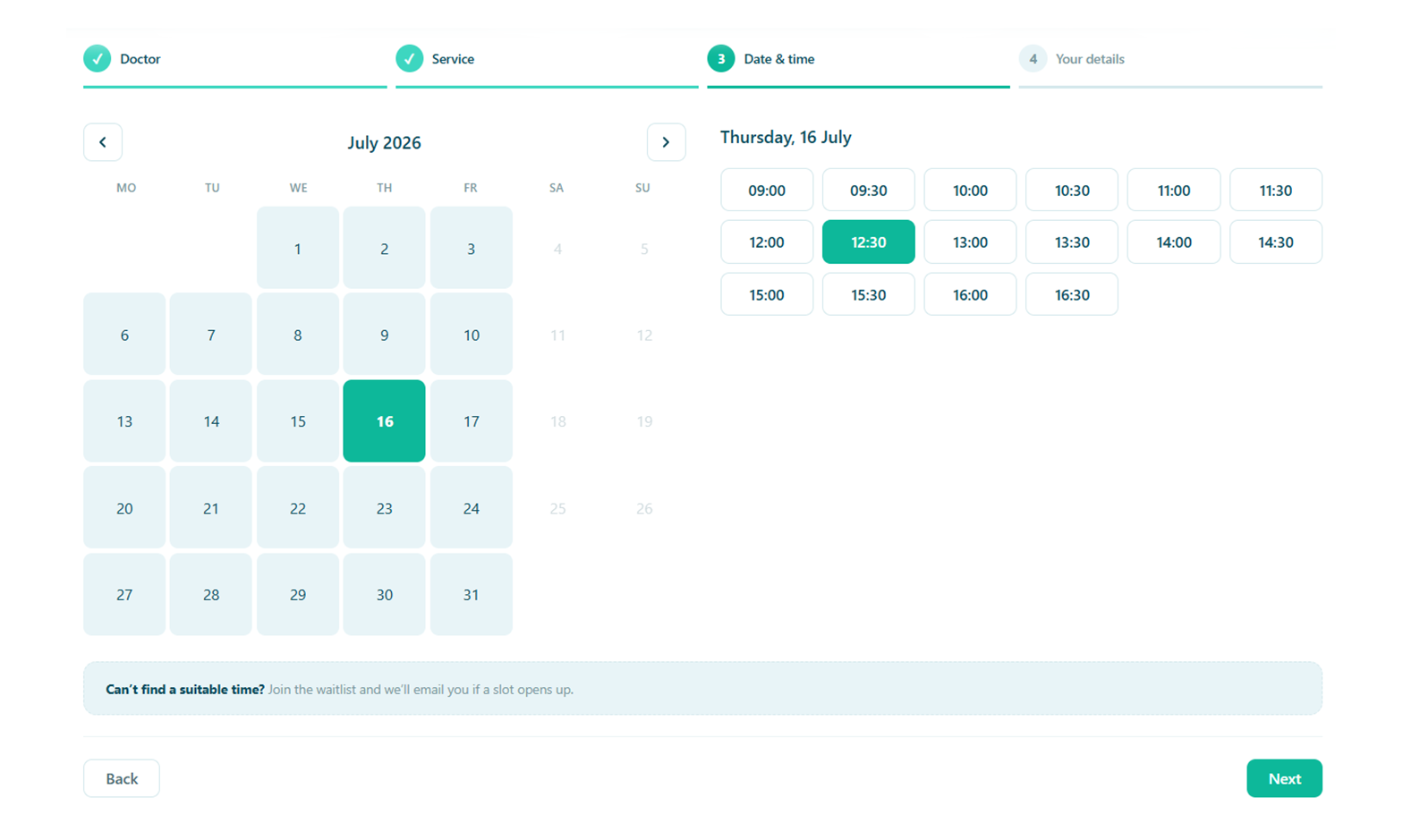
Keep chairs full, with less admin
Patients book the right dentist and treatment online, pay a deposit to lock it in, and get reminded automatically. Your front desk stops playing phone tag.
- Recurring recalls for check-ups and hygiene visits
- Deposits plus SMS / WhatsApp reminders to cut no-shows
- A waitlist that fills cancellations automatically
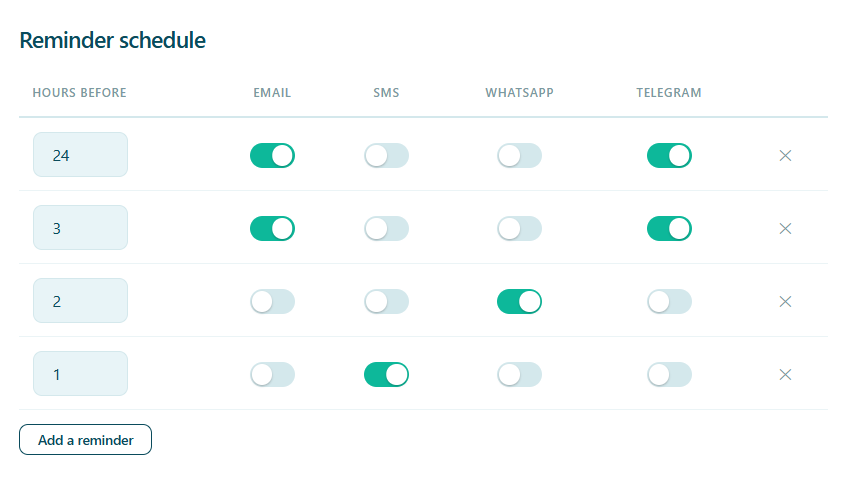
Nobody has to ring round
You decide how far ahead each reminder goes out and which channels it uses. A missed check-up costs a chair for half an hour, so the reminders run whether or not anyone at the desk remembers.
- Email, SMS and WhatsApp, at the intervals you choose
- Two reminders for a visit booked weeks out, one for tomorrow
- A deposit at booking for the treatments worth protecting
Treatment records, X-rays and all, on your own hosting
A dental record is a medical record. Alnora keeps histories, notes and uploaded images in your own WordPress database — encrypted there, with no Alnora cloud in the middle and no fee per patient.
AES-256 at rest
Histories, contact details and uploaded X-rays are encrypted inside the database itself.
You can hold the key
Move the encryption key out of the database into wp-config.php, so a stolen dump is useless on its own.
Dentist, hygienist, reception
Each practitioner gets their own diary and patients. Reception can have the bookings without the clinical notes.
GDPR without an add-on
Export, erasure, consent records and an audit log are part of the plugin, not a second purchase.
What a dental practice usually runs, and what it could run instead
The usual stack
A salon booking plugin, WooCommerce behind it for payments, a forms plugin for medical histories, a GDPR add-on, and a recall list in a spreadsheet. Five things to keep updated and five places patient data sits.
Alnora on its own
Booking, recalls, deposits and payments, medical history forms, encrypted records, reminders, invoices and GDPR tools — one plugin, inside the WordPress site you already run.
Before you switch
Will it actually chase our six-month recalls?
Mark a check-up as recurring and the patient books the whole pattern in one step, seeing every date before they confirm. If a repeat lands on a closed day or a full slot it rolls forward to the next free time rather than disappearing, so nobody has to reconcile a list by hand.
Can patients book a check-up and a hygiene clean together?
Yes. Let a patient choose more than one treatment in a single visit and the durations and prices add up automatically, with the whole block reserved rather than two appointments that happen to be next to each other.
Where do X-rays and medical histories end up?
In your own WordPress database and uploads folder, on your own hosting. Fields you mark as sensitive are encrypted with AES-256, and the encryption key can live outside the database so a copy of it cannot be read on its own.
Can a hygienist see their own diary but not everything else?
Yes. Each practitioner signs in to their own diary, services and patients, and reception can be given bookings without clinical notes. Every permission is re-checked on the server, so it is not a matter of hiding buttons.
Do we need WooCommerce to take deposits?
No. Stripe and PayPal connect directly, including percentage or fixed deposits on the treatments worth protecting. Invoices come out as branded PDFs, and a cancelled visit can be refunded to the patient’s card from the appointment itself.
More answers on the full FAQ page.
Give your dental practice software that fits.
Start free, or unlock the full toolkit with Pro — 30-day money-back.
Not sure where to start? Read the documentation.