Calm, private booking for your practice
See clients in person or online, keep notes confidential, and let recurring sessions and reminders run themselves — all from your own WordPress site.
Everything a therapy practice needs
From recurring sessions to confidential notes, Alnora fits how you work.
In-person or online
For telehealth sessions Alnora generates a Zoom or Google Meet link automatically and sends it to the client — see people however suits them.
Recurring weekly sessions
Clients book an ongoing weekly or fortnightly slot in one step — they preview every session date before confirming, and can pay for the whole block of sessions online at once.
Confidential, encrypted notes
Session notes and documents are encrypted (AES-256) and kept on your own server — private by design, never sent to third-party clouds.
Client self-service portal
Clients log in to view, cancel or book sessions themselves — fewer messages for you, more control for them.
Gentle reminders
Automatic email, SMS and WhatsApp reminders cut missed sessions without you having to chase anyone.
Deposits & payments
Take a deposit to protect your time against late cancellations, accept Stripe or PayPal, and issue a clean invoice after each session. When a client cancels in time, refund them in full or in part straight to their card.
Reschedule in a click
Plans change — move a session to a new time from the appointment’s details panel, and the client is re-notified by email, SMS and WhatsApp while your calendars update automatically.
A calmer week, on repeat
Clients book their own slot, get their own reminders, and their notes stay where only you can read them.
They book
A client picks a time that suits them, in person or online, and answers your own intake questions while they book.
It repeats
Turn the slot into a weekly or fortnightly session in one step. Every date is shown before they confirm, and a block can be paid for at once.
You write it up
Session notes and documents sit encrypted against that client’s record — no shared drive, no notebook, no third-party service in the middle.
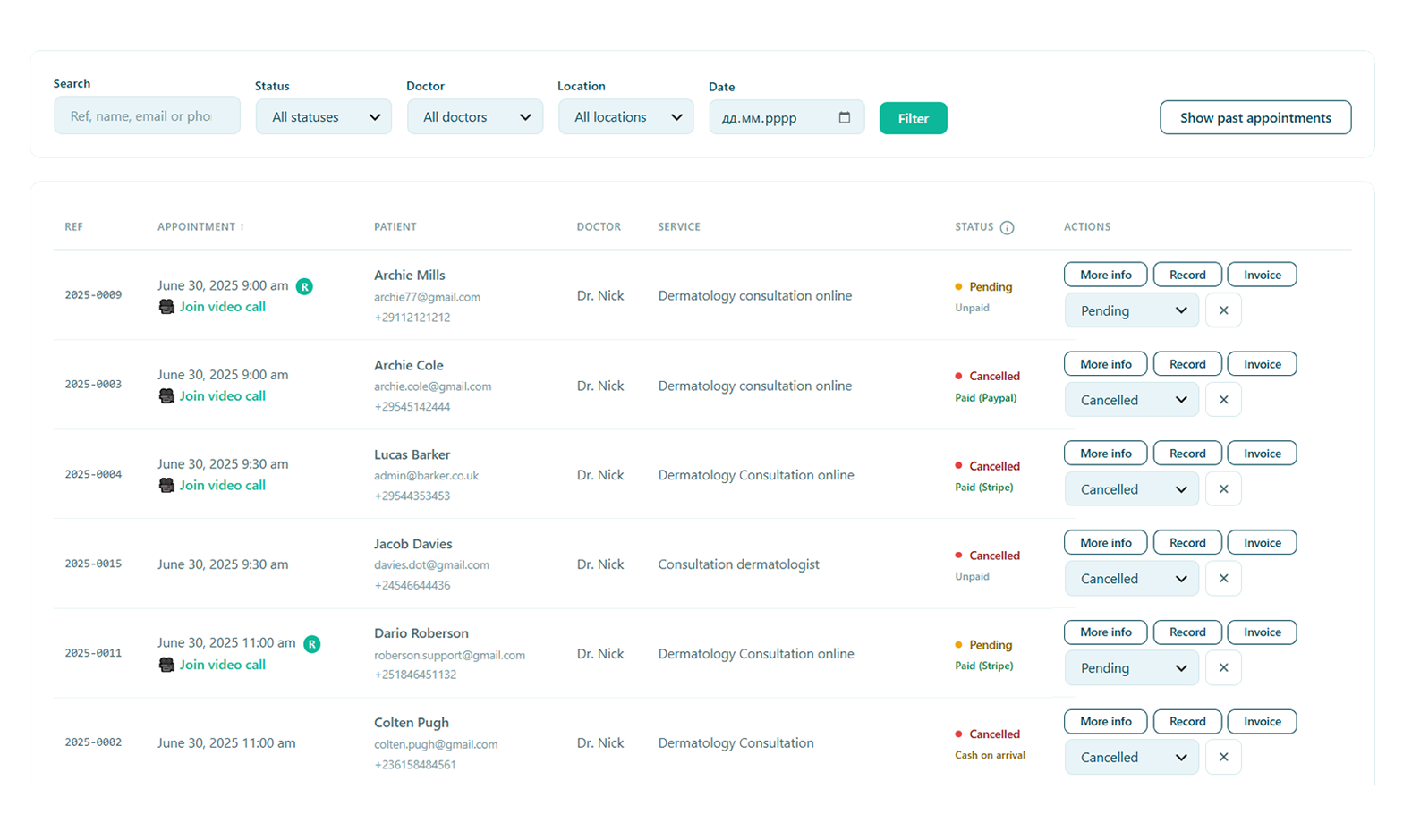
A full calendar, with less admin
Clients book the right session type, get a telehealth link when it’s online, and are reminded automatically. You stay focused on the work, not the diary.
- Recurring weekly or fortnightly sessions
- Automatic Zoom / Google Meet links for online sessions
- Deposits and reminders to reduce late cancellations
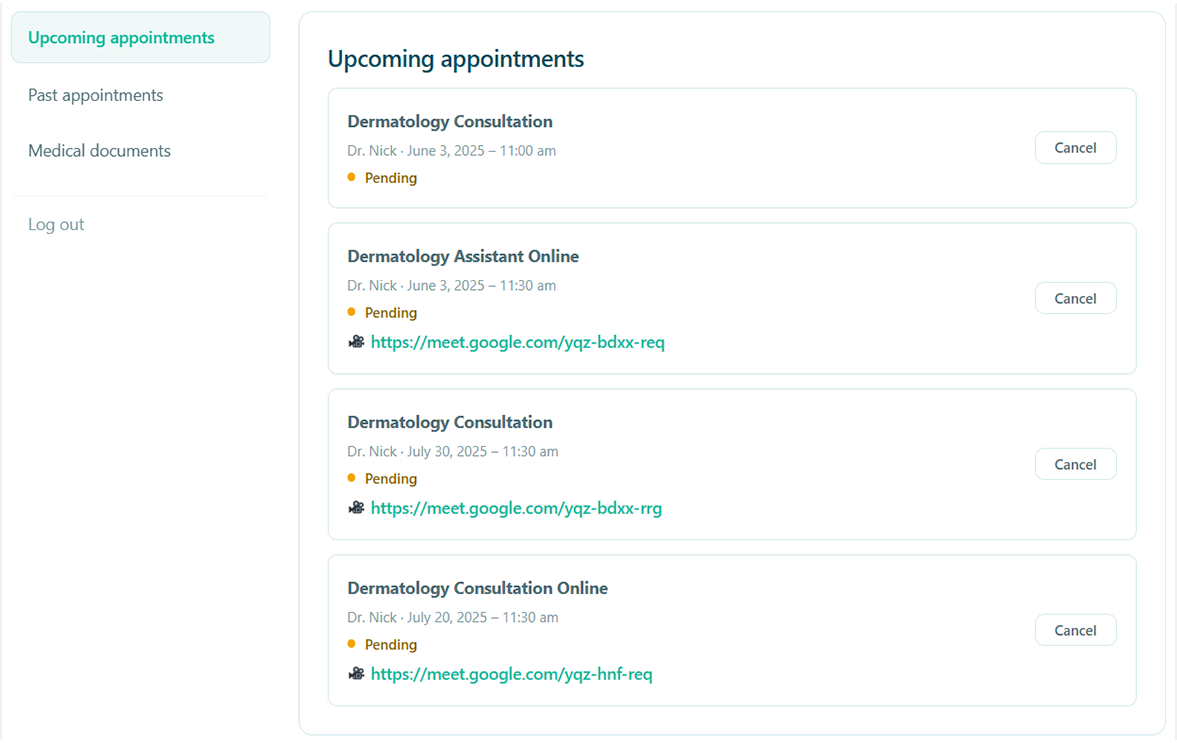
Fewer messages to answer
Clients sign in to see their upcoming sessions, cancel inside your notice period and book the next one themselves. That is most of the back-and-forth gone, without anyone having to phone you.
- Their own sessions, past and upcoming, in one place
- Cancelling and rebooking inside the rules you set
- No separate service to sign up for — it is your own site
What a client tells you stays between you
Therapy notes are the most sensitive records a small practice holds. Alnora keeps them in your own database, encrypted — with no Alnora cloud in the middle and no fee per client.
AES-256 at rest
Notes, contact details and uploaded documents are encrypted inside the database itself.
You can hold the key
Keep the encryption key outside the database, in wp-config.php, so a stolen copy reveals nothing.
Nobody else in the room
No third-party service processes your notes. Nothing leaves the hosting you chose yourself.
GDPR without an add-on
Export, erasure, consent records and an audit log come with the plugin, not as a second purchase.
What a small practice usually runs, and what it could run instead
The usual stack
A booking plugin, WooCommerce behind it to take payments, a forms plugin for intake, video links pasted in by hand, and session notes in a document somewhere. Five places a client’s name ends up.
Alnora on its own
Booking, recurring sessions, deposits, intake forms, automatic Zoom or Meet links, encrypted notes, reminders and GDPR tools — one plugin, inside the WordPress site you already run.
Before you switch
Can I see clients online as well as in person?
Yes. Mark a service as telehealth and Alnora creates a Zoom or Google Meet link for each booking, then sends it with the confirmation and the reminders. You never paste a link by hand or reuse one room for everybody.
Are session notes genuinely private?
They stay in your own WordPress database, on hosting you chose. Fields you mark as sensitive are encrypted with AES-256, and the key can live outside the database — so a copy of the database alone cannot be read.
Can clients set up a weekly slot themselves?
Yes. A recurring service lets a client book a weekly or fortnightly session in one step, see every date before confirming, and pay for the block in a single checkout if you want them to.
What happens when someone cancels at the last minute?
You set the notice period. Inside it, clients cancel or rebook themselves; outside it they cannot, and a deposit taken at booking protects the hour. If you decide to refund, it goes back to their card from the appointment itself.
I work alone. Is this more software than I need?
It is one WordPress plugin, and the free version already covers a single practitioner taking bookings. Features you do not want can be switched off in Settings rather than worked around.
More answers on the full FAQ page.
Give your practice software that fits.
Start free, or unlock the full toolkit with Pro — 30-day money-back.
Not sure where to start? Read the documentation.